Retargeting
What happens to your projects when you jump between OS'es or when you rearrange your media files in other directories later on? First of all, EWOCvj2 will check for your files over Windows drive letters, Linux mount points and Mac volumes, which means that, when the directory structure remains intact, the program will look for your media files on all available disks automatically and tranparently, allowing use of projects everywhere, not depending on disk locations.
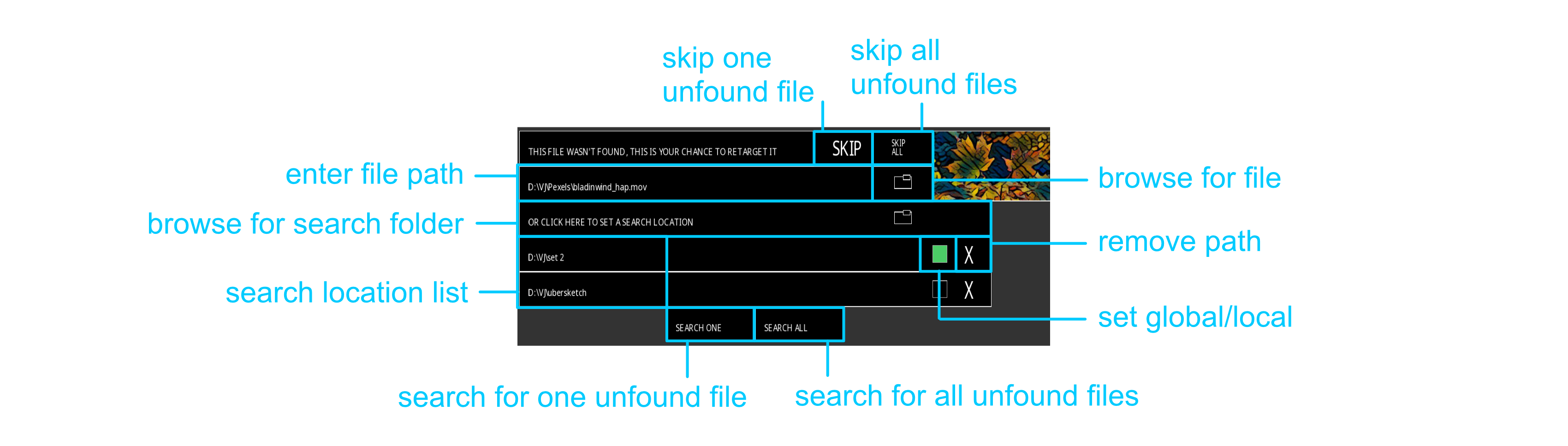
Second, the program has a "retargeting" engine, which is capable of detecting which media files aren't found on their stored paths (when you eg. clean out and rearrange directories) and gives you a few options to retarget/refind them:
-
Typing the new path with the keyboard.
-
Browsing for the new file path.
-
Skipping either the one file or all of them at once.
-
Setting search location folders, in which a recursive search will be done, including all subdirectories. Search will optimize for file name, falling back to a filesize match system that will intercept files of which the name has been changed (the chance that two media files with the exact same filesize would exist is next to zero). Two different types of search locations can be set up by clicking the box at the right of the search location name:
-
Local: are only searched this session and forgotten afterwards.
-
Global: the program will remember your search location setting and reuse it/them whenever retargeting launches again. Global search locations can also be set up/changed in the Preferences window, under "Directories".
-
You can click the "X" next to a search location's path to remove it from the search. You can search the set locations for either one file at a time or all of them at once.
When you resave your project after retargeting files, only then the new file locations will be saved with your project.